Webhook Setup
This guide walks you through setting up webhook endpoints in your application and configuring them in the HouMeerOver system.
Prerequisites
Before setting up webhooks, ensure you have:
- Administrator access to the HouMeerOver system for your municipality
- HTTPS-enabled web server or application to receive webhook requests
- Ability to handle HTTP POST requests in your application
Step 1: Create Webhook Endpoint
Create an endpoint in your application to receive calculation result webhooks. The endpoint should:
- Accept HTTP POST requests
- Handle JSON payloads containing calculation data
- Verify webhook signatures using HMAC-SHA256
- Return appropriate HTTP status codes
Step 2: Configure Webhook URLs in HouMeerOver
Once your webhook endpoint is ready, configure it in the HouMeerOver admin interface:
Accessing Webhook Configuration
- Log in to the HouMeerOver admin interface with administrator privileges
- Navigate to Calculations → Webhooks
- Select your municipality's webhook configuration
Configuring Webhook Settings
- Enable Webhook: Check the "Enabled" checkbox
- Webhook URL: Enter your webhook endpoint URL (must be HTTPS in production)
- Secret: A webhook secret is automatically generated for security
- Click "Save" to activate webhook delivery
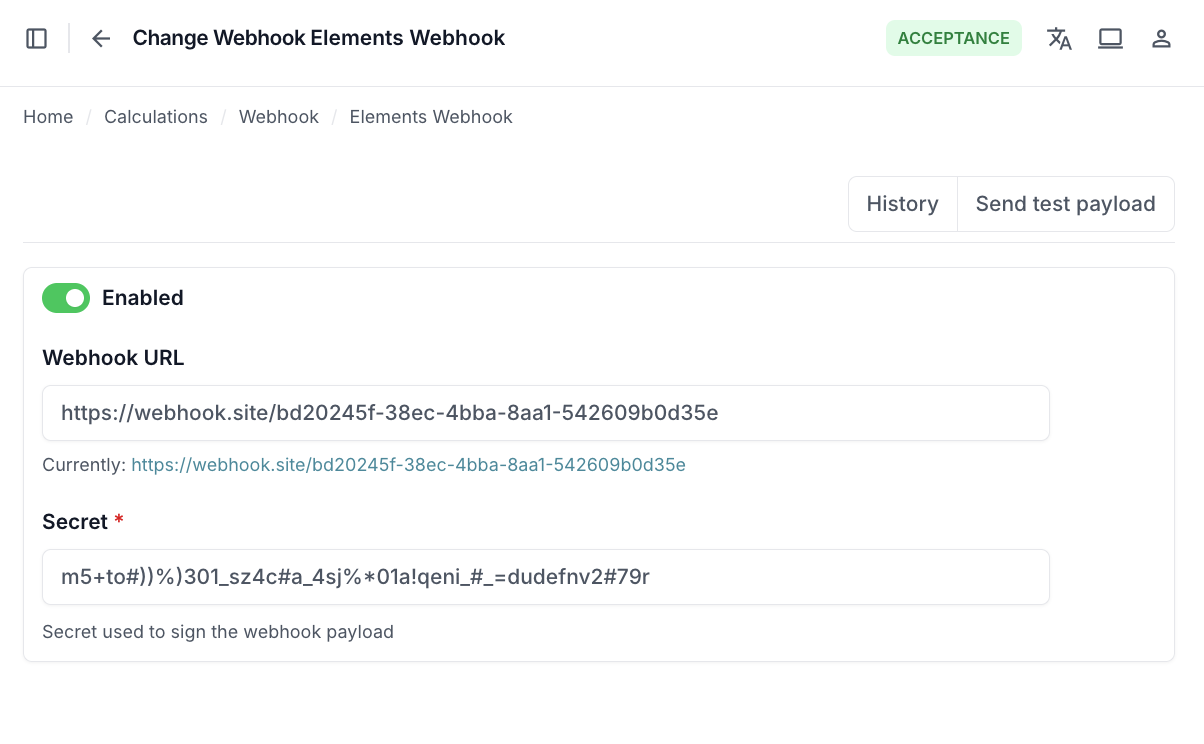
Webhook Configuration Options
- Enabled: Enable/disable webhook delivery for calculation results
- URL: Your webhook endpoint URL (HTTPS required for production)
- Secret: Automatically generated secret used to sign webhook requests for security verification
The webhook will automatically trigger when calculation results are received from the calculation engine.
Step 3: Testing Webhooks
Test Webhook Delivery
- In the webhook configuration, click the "Send test payload" action
- This sends a test calculation result to your webhook endpoint
- Check your application logs to verify receipt and processing
- Verify that the webhook signature validation works correctly
Manual Testing with Sample Payload
You can manually test your webhook endpoint with a sample payload:
# Test webhook endpoint with curl
curl -X POST https://your-app.com/webhooks/houmeeover \
  -H "Content-Type: application/json" \
  -H "X-Webhook-Signature: sha256=test-signature" \
  -d '{
    "subsidy_amount": 1250.50,
    "calculated_at": "2024-01-15T10:35:42.789123Z",
    "created_at": "2024-01-15T10:30:00.123456Z",
    "modified_at": "2024-01-15T10:35:42.789123Z",
    "address": {
      "municipality": "0344",
      "postal_code": "1234AB",
      "house_number": 42,
      "house_letter": "A",
      "house_number_addition": ""
    }
  }'
Step 4: Production Deployment
Security Best Practices
- Use HTTPS: Always use HTTPS URLs for webhook endpoints in production
- Verify Signatures: Always verify webhook signatures using the
X-Webhook-Signatureheader - Validate Payloads: Validate incoming calculation data structure
- Logging: Log webhook deliveries for monitoring and debugging
Retry Logic
HouMeerOver will retry failed webhook deliveries with exponential backoff:
- Max Retries: 5 attempts
- Retry Backoff: 180 seconds (3 minutes)
- Success Criteria: HTTP status codes 200-299
- Retry Criteria: Server errors (5xx status codes)
- No Retry: Client errors (4xx status codes)
Monitoring Webhook Delivery
Admin Interface Monitoring
Monitor webhook delivery in the HouMeerOver admin:
- Navigate to Calculations → Webhook entries
- Review the delivery log for your municipality's webhooks
- Check successful, failed, and pending deliveries
- View delivery timestamps, status codes, and error details
Next Steps - Learn about webhook payload formats →
Getting Help
If you experience issues:
- Check webhook delivery logs in the HouMeerOver admin interface
- Review your application logs for detailed error information
- Test with the admin test function to isolate issues
- Contact HouMeerOver support with specific error details and webhook entry IDs
When contacting support, please include:
- Webhook entry ID from the admin interface
- Your webhook endpoint URL
- Relevant error messages from your application logs
- HTTP status codes returned by your endpoint
This documentation is part of the HouMeerOver Third Party Integration integration guide.