Server-to-Server Authentication
This guide covers setting up OAuth2 Client Credentials flow for server-to-server authentication with the HouMeerOver API. This is the recommended approach for most municipal system integrations.
What are Client Credentials?
Client Credentials is an OAuth2 authorization grant type designed for server-to-server communication where:
- No user interaction is required
- The application itself is the resource owner
- Automated processes need API access
- Municipal systems integrate directly with HouMeerOver
When to Use Client Credentials
✅ Recommended for:
- Municipal system integrations
- Automated data synchronization
- Background processing applications
- Scheduled reporting tasks
- System-to-system API calls
❌ Not suitable for:
- Web applications with user login
- Mobile applications
- Client-side JavaScript applications
- Applications requiring user consent
Creating a Client Credentials Application
Step 1: Access OAuth2 Applications
- Log into the HouMeerOver administration interface
- Navigate to Third Party Applications in the main menu
- Click Add OAuth2 Application to create a new application
📝 Admin Access: You can view all OAuth2 applications at:
https://api.houmeerover.nl/en/beheer/oauth2/application/
Step 2: Configure Application Details
Fill in the application information:
Basic Information:
- Name: Descriptive name for your integration (e.g., "Municipal ERP Integration")
- Description: Brief description of the integration purpose
- Municipality: Automatically set to your municipality
Application Type:
- Select "Confidential" for server-to-server applications
- This ensures your application can securely store client secrets
Authorization Grant Types:
- Check "Client credentials"
- Uncheck other grant types unless specifically needed
IP Whitelisting (Optional):
- Enable and add IP addresses that should be allowed to use this application
- Leave disabled to allow access from any IP address
- Recommended for production environments for additional security
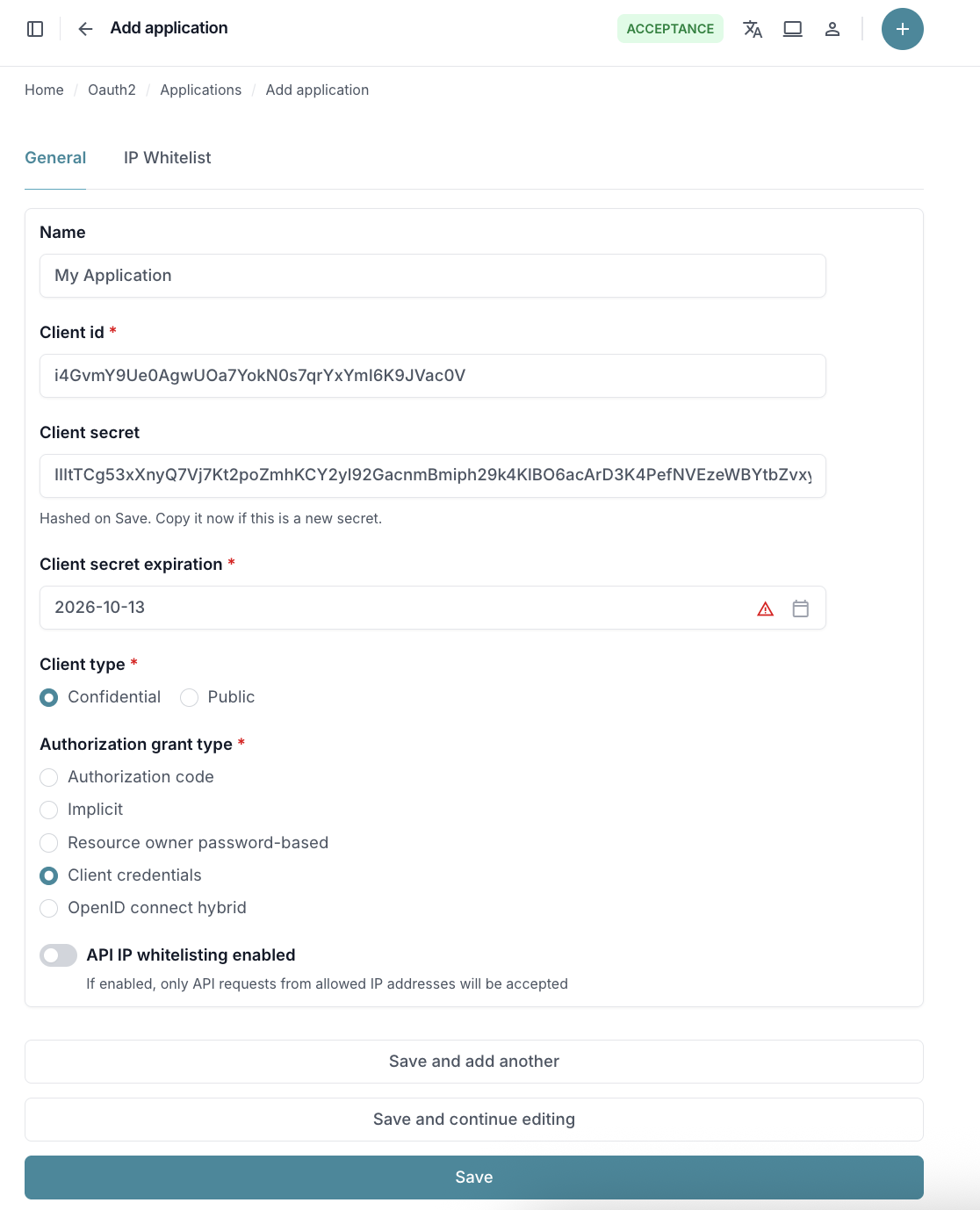
Step 3: Save and Get Credentials
- Copy the Client ID - you'll need this for API calls
- Copy the Client Secret - store this securely, it won't be shown again
- Click Save to create the application
- Note the Token URL:
https://api.houmeerover.nl/o/token/
⚠️ Important: The client secret is only shown once, before you save the application form. Store it securely immediately after creation.
Getting and Using Access Tokens
Step 1: Request Access Token
Make a POST request to the token endpoint to get an access token:
curl -X POST https://api.houmeerover.nl/o/token/ \
  -H "Content-Type: application/x-www-form-urlencoded" \
  -d "grant_type=client_credentials&client_id=YOUR_CLIENT_ID&client_secret=YOUR_CLIENT_SECRET"
Response:
{
  "access_token": "eyJhbGciOiJSUzI1NiIsInR5cCI6IkpXVCJ9...",
  "token_type": "Bearer",
  "expires_in": 3600
}
Step 2: Use Access Token in API Calls
Include the access token in the Authorization header:
curl -X GET https://api.houmeerover.nl/api/v1/calculations/ \
  -H "Authorization: Bearer eyJhbGciOiJSUzI1NiIsInR5cCI6IkpXVCJ9..."
Security Best Practices
Client Secret Management
🔒 Secure Storage:
- Store client secrets in environment variables or secure key management systems
- Never commit secrets to version control
- Restrict access to authorized personnel only
🔄 Secret Rotation:
- Rotate client secrets regularly (recommended: every 90 days)
- Monitor expiration dates and set up alerts
- Update all applications before old credentials expire
Token Security
Token Handling:
- Store access tokens in memory only
- Never log access tokens
- Use HTTPS for all API communications
- Access tokens expire after 1 hour - implement automatic renewal
IP Whitelisting
When to Use:
- Enable IP whitelisting for production applications
- Add your server's static IP addresses during application setup
- Provides an additional security layer beyond client credentials
Configuration:
- Enable IP whitelisting in the OAuth 2 application settings
- Add IP addresses in the IP Whitelist tab
- Specify IP address to whitelist (e.g.,
192.168.1.1) - Use CIDR notation for IP ranges (e.g.,
192.168.1.0/24) - Leave off only for development environments
Troubleshooting
Common Issues
1. Invalid Client Credentials
Error: 401 Unauthorized - Invalid client credentials
Solutions:
- Verify client_id and client_secret are correct
- Check if the application is active in admin interface
- Regenerate client secret if expired
- Ensure your server IP is whitelisted (if IP whitelisting is enabled)
2. Token Request Fails
Error: 400 Bad Request - Unsupported grant type
Solutions:
- Verify "Client credentials" is enabled in application settings
- Check request Content-Type is
application/x-www-form-urlencoded - Ensure all required parameters are included
3. API Calls Fail with Token
Error: 401 Unauthorized - Invalid token
Solutions:
- Check token expiration and refresh if needed
- Verify Authorization header format:
Bearer {token} - Ensure no modifications to the token string
4. IP Address Blocked
Error: 403 Forbidden - Network access not allowed
Solutions:
- Add your server's IP address to the application's IP whitelist
- Verify you're connecting from the whitelisted IP address
- Contact your network administrator to confirm your public IP
Getting Help
For additional support:
- Check the HouMeerOver API Documentation
- Contact technical support with:
- Application name and client_id (never share client_secret)
- Error messages and timestamps
- Your server's IP address (if IP whitelisting is enabled)
Next: Learn about Delegated User Authentication for applications requiring user interaction, or explore API Endpoints to start making API calls.